Thursday, July 11, 2013

Week 3: Tune into Technology

It's Thursday and it's time for Round 3 of Tune into Technology with iTeach1:1 and Learning to the Core.

iPad...oh iPad, what did I ever do before you?  Its officially been a year since I was first introduce to an iPad.  I know...can you believe it?  Last year, our district decide to offer us a teacher iPad to practice on over the summer.  In the fall, they added three more iPads to our classroom and I instantly fell in love.  I can't even understand how I was "tech-savy" before.

Here's some of my favorite apps that I use in the classroom regularly...

Background: Yellow and Blue Scribble
Enjoy,

Wednesday, July 10, 2013

Workshop Wednesday: Reader's Workshop Notebook

Happy Wednesday!  I'm teaming up with Ideas by Jivey to share with you an idea for a workshop within my classroom.

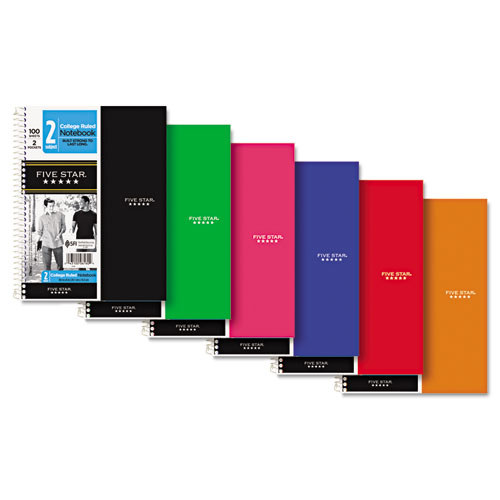
This week, I'd like to talk about our Reader's Workshop Notebook which is known as a Literacy Notebook in my classroom.  This notebook is the heart and soul of our hard work during our literacy block.  We use the notebook to record Shared Reading lessons, Reader's Responses and Station work.  As part of our supply list, it is asked that students purchase a five-subject 5 Star Notebook.
I know what you're thinking..."How can you ask students to purchase such an expensive notebook?" Well, my team has found that this is the only notebook that can with stand our literacy love and last the entire year.

Since the notebook has five sections, I have found success with having:

  • Shared Reading (1 section)- Students use this section to record their thinking from strategy driven lessons.  For example, students may record on this inference chart that we used when we read the book, Something Beautiful.                                                                                                                                       
Frame: Purple Chalk Frame-It's a Wicked Good Life
  • Reader's Response (2 sections)- In this section, students write weekly responses on our read aloud book.  These responses include a current summary and the use of two read strategies that demonstrate their thinking.  Below is a graphic organizer (which can be downloaded from my TPT store) that I often use with students.
     
  • Station Section (2 sections)- The final section is used for when students are at stations and I'm meeting with guided reading groups.  The students are responsible for recording their work to show a quality use of their time when they're not meeting with me.
I hope that this provides a helpful idea on how you can organize your own notebooks.  Feel free to link up and share your ideas!

Enjoy,

Monday, July 8, 2013

Monday Made It #2

WAHOO!  I finally have a Monday Made It related to school.  I've been trying to get started on some projects now so that when August rolls around I can still enjoy my summer.


For this project, I decide to make our lunch count check-in using SMART notebook.  The kids absolutely love moving their little number as I display the count on our projector for everyone to see.  This not only holds them accountable for making their choice, but then I can also take attendance while still handling the morning madness!

The background is called Waves and the font is LD Elementary.

Enjoy,

Sunday, July 7, 2013

Week 2: Tune into Technology

I know, I know, it's not Thursday, but it's the first chance that I've had to sit down and focus on my blog.  I'm liking up with iTeach1:1 and Learning to the Core for a second week of integrating technology.  Here it goes....

Week 2 Theme: Integrating Technology into Math

Here's two easy ways to integrate technology into your daily math:

1. Sumdog - I've talked about Sumdog earlier and it's one of the easiest ways to incorporate technology into math.  I've been using Sumdog as a tool for summer math practice, but I'm excited to have my new students use Sumdog during the school year as a math station.

2. ShowMe Interactive Whiteboard- It's Monday morning and you're fresh off the weekend only to discover that you have a student with not one, but two broken wrists.  What are you to do?  Don't laugh....it happened!  Enter the app, ShowMe.  I had the student use the ShowMe to complete our math lessons without missing a beat.  He enjoyed using the app and so did the rest of the class too!  They loved the fact that they could write on the iPad and have it appear on our projector.


Enjoy,

Monday, July 1, 2013

Monday Made It

It's the 1st of July and my first Monday Made It project.  As much as I'd like for this project to be for my classroom...it's not.  This is the first summer that I've had to spend in the new house and the project ideas just keep flowing.  

I stood in the kitchen on Saturday night and was starring at my pantry door thinking that it needed something.  As my mind started to wander, I was trying to figure out what I could do to make the door pop and not "blend in."  That's when I landed on this idea...a chalkboard!  The inspiration came from Jackie over at Teal & Lime

I was able to find the roll of chalkboard vinyl at Michael's on clearance for $2.99.  After putting the vinyl on, I realized that traditional chalk was not giving me the bold colors.  That's when I stumbled across another Pinterest find....Chalk Ink Markers. (Thanks to Megan at Honey We're Home for posting.)


After all that, my final project...

Link up and join the fun of Monday Made Its...Thanks Tara!

Enjoy,

Sunday, June 30, 2013

Tune Into Technology: Integrating Technology into Reading

I'm linking up with iTeach 1:1 and Learning to the Core to share some exciting ways of incorporating technology into your classroom.

Week 1 Theme: Integrating Technology into Reading

For reading, I use the guided reading format in which the students are either reading with me for 30 minutes or they're at a literacy based station for 30 minutes.  

Top 5 Ways to Integrate Technology into Reading-
Literacy Station Style
1. Edmodo (Technology Station)
It's the safe, school version of Facebook allowing students to post questions, comment on questions within their feed and even message the teacher directly.  We use Edmodo to post our reaction to our latest read aloud book.


2. Spelling City (Word Work Station)
I use Spelling City to personalize spelling lists for students who may need additional practice.  This has been a excellent tool to use when trying to differentiate for the needs of my students.

3. BrainPOP (Research Station)
Love it and so does my class!  My students watch the featured video (which changes daily) and follow-up with a summarizing activity in their Literacy Notebook.  It's so exciting to see their responses because BrainPOP offers high-interest topics that the kids love! 

4. National Geographic Kids (Research Station)
Similar to BrainPOP, my students use the National Geographic Kids to watch high-interest videos on a topic of their choice.  Before watching the video, students make predictions and summarize their factual findings at the end.  

5. Google Drive (W.E.B. [We Enjoy Books] & Response Station) 

This spring, I was lucky enough to pilot Google Drive with my class.  Students created a Google account that allowed them access to only Google Drive.  (This was thanks to the technology department within my district.)  The students used Google Drive to work on their typing skills by sharing their weekly literacy response with me.  This was a huge hit and I can't wait to get it up and rolling again in the fall.  

Join the fun and link up to share your ideas! 

Enjoy,

Thursday, June 27, 2013

Making a Move

It's finally summer break and I feel like June has already flown by.  It's in an out before I can even tackle any projects that I want to do for school.  That might have something to do with the fact that I:
jumped a plane to Florida for a vacation.
just finished working on district curriculum projects.

     
completed a few around the house projects.

woke up to a flooded basement. 

Even with June being a busy month, I've still had time to make the move to Bloglovin'.  It's the latest craze because it keeps you updated with the latest blogs you're following.  <a href="http://www.bloglovin.com/blog/5562943/?claim=nksbgwuuwyw">Follow my blog with Bloglovin</a>
I've also been checking in on how my students are doing with Sumdog and it continues to be a hit!  I was rather surprised considering that it's the end of June and I figured the excitement would have faded by now.  This definitely puts a smile on my face knowing that my students are continuing their practice even into the middle of summer vacation!

Enjoy,